Surface Editor window
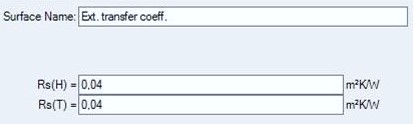 Surface
Editor is used to maintain properties of surface. This window is displayed as
part of
Surfaces window.
Surface
Editor is used to maintain properties of surface. This window is displayed as
part of
Surfaces window.
| Surface name | Name of surface. It is used for documentation purpose. |
| RS | Defines the thermal transfer resistance of the
surface. RS = 1 / α |
| New | Adds a new entry to the surface list and selects it for editing. |
| Delete | Deletes the currently selected surface from surface list. |
| Prev. | Selects previous surface in the surface list for editing. |
| Next | Selects next surface in the surface list for editing. |
Important: Changes to surface properties in the project specific surface list do not automatically propagate to properties of construction elements. Applying new surface properties to selected elements must be done explicitly - either by a double-click onto a list item or via a drag-drop operation from the surface list.
Note: You shall switch between input fields by using the TAB-key. Using that key confirms the data entry. On the other hand it provides a good alternative compared to permanent mouse use.
See also: Surfaces window, Alpha (surface transmittance) hidden (application setting)