Tip of the day (Dialog)
The Tip of the Day displays some useful information within a dialog window. This hints are mostly helpful to new users of AnTherm, but even experienced users shall revisit this window from time to time to receive new short informations.
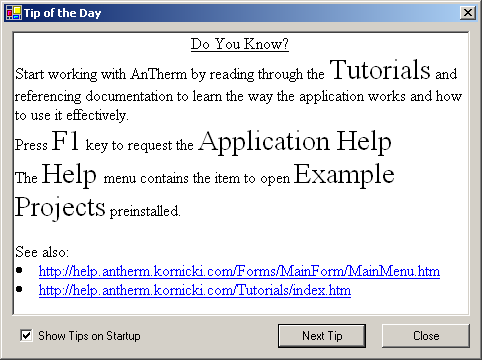
The dialog window is shown automatically on each application start (this can be turned off) or from the Help Menu "Tipp Of The Day...".
| Show Tips on Startup | Having this checkmark set the dialog window will show at
each application start. Remark: This switch can be be turned off only after all tips have been shown several times. This shall emphasize the importance of those tips for new users. (All tips have been watched at least 2 times for at least 10 seconds in average; or the user clicks 10 times through all tips. Data is stored within ApplicationSettings/UsageStatistics). |
| Next Tip ENTER-key |
Show the next tip. Remark: After showing all text components installed with the program first tip will be shown again. |
| Schließen ESC-Taste |
Closes the dialog window. |
Remark: Additional information linked from the displayed content are often located on the internet. To display these additional content internet connection is needed.
See also: Help Menu, Tutorials and Cookbooks