Probe Points / Extreme (min/max) Locations window
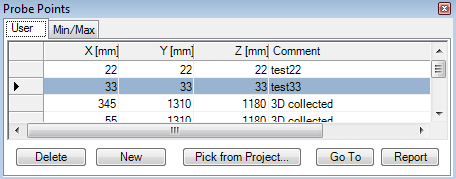
The window Probe Points is used to input any number of arbitrary points for which the Probe Points report shall be generated (second part of Results report). The list of probe points can be extended from the Result 3D window (Probe) also (by "Collect point").
The Min/Max tab of the window lists interesting locations with extreme values (e.g. points lowest and highest temperatures at surfaces of all spaces and within the interior of all power sources) thus providing the ability to select them for further evaluation. This read only listing is automatically provided and updated as soon as any boundary conditions have been applied to the solution.
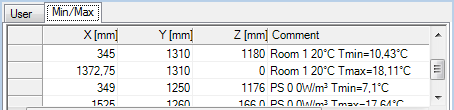
| X, Y, Z | Coordinates of the point in millimetres |
| Comment | An (optional) description of the point entered (used for documentation only) |
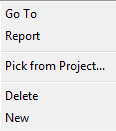
| Delete/New | Deletes the current data line or append a new one |
| Pick from Project... | Probe points saved within another project will be read and appended to the list. |
| Report | Confirms the data entry and initiates the creation of
probe points in the Results
report. |
| Double click
onto data record mark Go To |
Initiates translation of the current
probe point shown in the
Result3D window to the
position shown in the line clicked - it translates
Slices X/Y/Z accordingly.
Within a 2D-project the Z-slice is set to 500 mm. Remark: It is data shown in the currently marked line transferred - this means, that a double click onto column or new row will also result in setting the current probe point to values shown selected by data mark arrow. |
 The input is confirmed by pressing the button Apply.
The second part of Results
report will show evaluation of temperatures for all points (x, y, z
coordinates) entered in this window. If some point does not belong to the
interior of the construction no temperature values will be shown in the
corresponding line of the report.
The input is confirmed by pressing the button Apply.
The second part of Results
report will show evaluation of temperatures for all points (x, y, z
coordinates) entered in this window. If some point does not belong to the
interior of the construction no temperature values will be shown in the
corresponding line of the report.
Probe points entered are saved to the project file.
Remark: Similar evaluation of one probe point is available within graphical results of the application.
Remark: The active tab will be saved upon the window is closed together with the application settings (LastSelectedProbePointsFormTabPageName) and restored when this window is opened again.
Remark: While "Collect Point" (e.g. out of "Results 3D window") is requested the window will switch to the "User" tab where the new probe point will be appended.
See also: Results report,
Boundary
Conditions window, Evaluation windows,
Probe (control panel),
Coordinate system, Slice X,
Y, Z (control panel), Timelines window