General  (control panel)
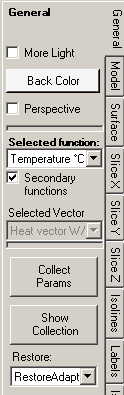 The
control panel General is used to set and adjust general parameters of the
visualization.
The
control panel General is used to set and adjust general parameters of the
visualization.
| More Light | Used to turn addition "light sources" on making the the resulting view brighter and displaying more contrast. |
| Back Color | Defines the colour of the background used within graphical window |
| Perspective | Switches the 3D view between
perspective projection and parallel projection. The parallel projection is especially useful during visualization of 3D models or slice views (see also Plan Views). |
| Function selected | By selecting an active function you define which
data will be visualized. When additional secondary
functions are calculated also (this is set with the switch „Secondary
functions") one of following functions can be selected for
the 3D visualization:
Which of these secondary function is actually calculated can be selectively defined within application settings by a parameter "Evaluate which secondary functions?". If no secondary functions (beyond temperature) are available the field is shown disabled. |
| Secondary functions | When the setting "secondary functions" is tuned off, only
temperature distribution within the model is calculated and offered for
evaluation. Turning this setting on requests calculation of additional scalar and vector functions. |
| Vector selected | By selecting an active vector field you define which
data will be visualized (e.g. during generation of
streamlines or vectors (hedgehog,
arrows). When additional
secondary functions are calculated also (this is set with the switch „Secondary
functions") one of following vector fields can be selected
for the 3D visualization:
Which of these secondary vector field is actually calculated can be selectively defined within application settings by a parameter "Evaluate which secondary functions?". If there are no vector fields available the field is shown disabled. |
| Collect Params | The current combination of numerous parameters set in all
control panels will be saved to the
list of Results3D parameters
as new entry. The list of parameters can be edited within Results3D parameters window (e.g. it can be named arbitrarily) or the required parameter combination can be selected from the list and applied to the current Results3D view. This provides the ability to quickly restore earlier saved combination of parameters allowing reproducible visualizations. The list of parameters is saved within project file. The Results3D Parameter window will be shown also. |
| Show Collection | The Results3D Parameter window will be shown. |
| Restore | Changes the
application settings deciding if the
recently
used combination of evaluation settings will be restored on initial display
of the Results
3D window. For more details see: Application setting "Restore last Result3D Parameters" |

The choice of evaluation function selected and the vector selected
retained within application settings and restored respectively.
If the earlier selection is not available within the current data set (i.e. respective secondary function was not calculated)
the selection will be reset to default. See also: Selected Function
specific evaluation parameters and the
application setting "Restore last Result3D Parameters".
Remark: As primary function selected we call the set of values used for
current visualization. One can select the temperature, heat stream density,
relative surface humidity etc. To reduce the time required for calculation, one
can suppress the calculation of secondary functions with the
switch "Secondary functions" (creation of data of each separate secondary
function requires approximately same time as the creation of the temperature
distribution alone when new boundary conditions are applied).
Calculating secondary functions can be significantly improved on multiprocessor systems (MULTICORE-Option).
| MULTICORE-option: Speeding up computationally intensive jobs by distributing them on multiple processors or processor cores for parallel execution is only possible with an active MULTICORE-Option of the program. |
 |
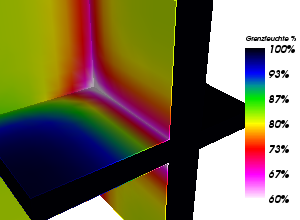
Remark: The relative surface humidity is defined only at the component's surface. At adiabatic boundaries (wonder foils) and at surface points hotter then the air space temperature the value of 100% is applied currently.
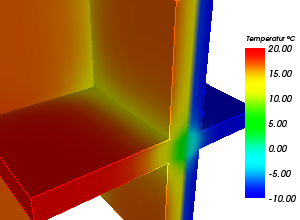
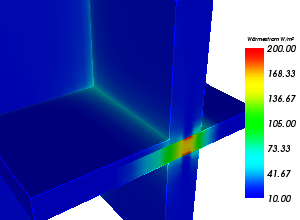
Following images display visualizations of different primary functions (Temperature °C , heat Stream Density W/m² , Relative Surface Humidity % ):
Remark: Producing a visualization of (heat) streamlines requires the calculation of the corresponding vector field of heat (or vapour) stream. Therefore you must turn the calculation of such required secondary vector field on to receive stream line visualizations (i.e. of secondary functions).
| VAPOUR-option: Analysis of multidimensional vapour diffusion is only possible with an active VAPOUR-Option of the program.. |
 |
See also: Results3D window, Active (setting), Opaque and Opacity (setting), Colorize (setting), More Light (setting), Background Colour (setting), Main menu, Application settings